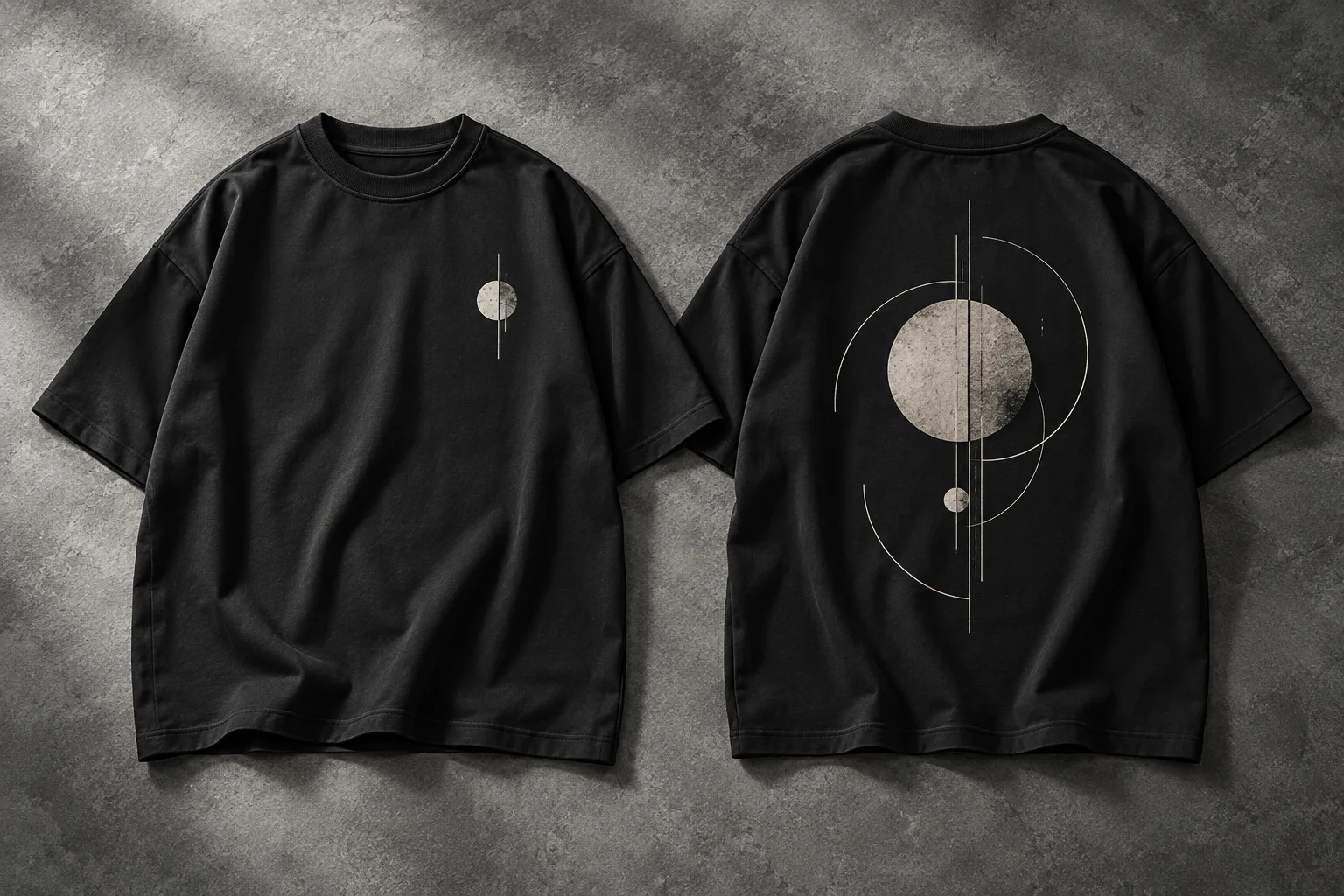
T-shirt design placement changes the way a garment communicates. A small front mark can feel personal and restrained. A large back graphic gives an illustration more room. Using both sides lets you connect those ideas across one piece of clothing.
MB POD Studio lets you work with front, back or both placements on the Minimal Basics Oversized Classic T-Shirt. The preview, resizing tools and alignment options help you explore the relationship between the artwork and the garment before submitting your request.
Start with the message you want the tee to carry, then choose a layout that supports it.
Give The Design A Clear Main Element
Decide what someone should notice first. It might be a logo, a symbol, a short piece of lettering or an illustration.
Try one main visual element before adding supporting details. Look at the whole shirt and ask whether the composition still feels clear. A graphic can be visually strong with plenty of space around it.
For a minimal clothing direction, think about how the tee will fit into an everyday outfit. The graphic, garment color and oversized silhouette should feel considered together.
When A Front Design Works Well
A front placement makes the design part of the first view of the outfit. It can work well for a brand mark, an illustration or a message you want to keep immediately visible.
Choose the scale based on the artwork itself. A compact symbol may work at a smaller size, while a detailed illustration may need more space to remain understandable.
After placing the file, zoom your attention back to the garment. Check whether the design feels balanced against the collar, shoulder line and length of the tee. Use the preview as a composition guide, then confirm any required physical dimensions with Minimal Basics.
When A Back Design Adds More Expression
A back graphic can give a design a second moment of attention. It is a useful option when an illustration, collection theme or larger visual idea needs room.
Switch the studio to the back view before positioning the artwork. Start near the center of the available preview area and adjust while watching the entire tee. Keep important details away from the edge of the artwork area shown in the studio.
Consider what the front should do alongside the back. A simple front can give the larger back composition more emphasis. You can also leave the front blank if that better suits the piece you want to create.
Make Front And Back Feel Connected
When you use both placements, connect the two sides through a shared shape, line style or color treatment. They can feel related even when their sizes and arrangements differ.
For example, an abstract circle on the front could introduce a larger composition on the back. A small wordmark could accompany an illustration in the same visual style. Keep the relationship easy to understand.
The current MB POD product price is $25 for a designed tee, whether you print the front, back or both. Shipping is additional. Review the current rates in the studio before submitting an order request.
Resize And Align Inside MB POD Studio
The artwork step gives you several ways to refine a layout:
- Resize the selected artwork to change its emphasis.
- Drag the image within the preview to adjust its position.
- Use center alignment for a balanced starting point.
- Try the top or bottom alignment option, then review the complete garment.
Treat alignment as a way to explore a composition. A design that is mathematically centered may still feel different depending on the shapes, empty areas or lettering inside the file.
If your artwork has a large transparent margin, consider that margin while positioning it. A cleaner export can make the visible design easier to align. The MB artwork preparation guide explains file formats, transparency and image detail.
Review The Layout On Every Color And Size Selection
A collection can use one graphic across several garment colors, but each preview deserves a separate look. A white line design may be clear on black and much quieter on a pale tee.
Use the selection queue to move between your color-and-size choices. The apply-to-all option can help you repeat artwork, after which you should check that the selected side, file and contrast are correct on each entry.
The size guide is available in Step 1 as a popup with inches and centimeters. If you are developing a range for customers, use the garment measurements and a physical sample to assess the complete fit and placement.
Use A Sample To Approve The Complete Piece
Before releasing a design to customers, confirm the sample arrangements and inspect the shirt in person. Look at the front and back while it is worn, as well as laid flat.
Check the placement relative to the garment, the readability of small elements and the way the design looks from a normal viewing distance. Record the approved artwork version and the color-and-size combinations you intend to use.
That record gives you a clearer reference for the next request or collection. When revising the design, change one main element at a time so you can see what the adjustment does.
Bring Your Layout Together In The Studio
Choose your color, size and quantity, then work on the print placements. Review every selection before moving to the final delivery and pricing step.
Open MB POD Studio to prepare your layout. The site currently submits an unpaid order request and saves the original artwork with it. Confirm payment, production and dispatch arrangements with Minimal Basics before planning a delivery commitment.
T-Shirt Placement Questions
Can The Front And Back Use Different Images?
Yes. Each side can have its own artwork and position, so you can build a coordinated layout using separate files.
Is Printing Both Sides More Expensive In The Current Studio?
The listed designed-tee price is the same $25 for front, back or both. Review the product and shipping total in the final step for the current rates.
Can I Move A Design After Uploading It?
Yes. Use the drag, resize and alignment controls in the artwork step, then review both garment views before continuing.